Choosing between Notion and Microsoft OneNote represents one of the most common digital
note-taking decisions students face, as both platforms offer powerful but distinctly
different approaches to digital information management that appeal to different
organizational preferences, technical comfort levels, and academic workflow requirements.
Notion provides a highly flexible, block-based workspace where databases, pages, and
customizable views create adaptable systems limited primarily by the user’s imagination
and setup investment. OneNote offers a more immediately familiar notebook metaphor with
free-form canvas pages, digital inking support, and straightforward multimedia note
capture that requires less initial configuration to begin productive use.
Rather than declaring a universal winner, this comparison examines how each platform
serves different student needs and preferences across organizational philosophy, note-
taking capabilities, collaboration features, platform availability, learning curve
considerations, and pricing structures. Understanding where each platform excels and
where each has limitations enables students to make informed choices based on their
specific academic requirements, technical preferences, and workflow priorities rather
than following general recommendations that may not match individual needs. This article
provides a comprehensive, balanced comparison designed to help you determine which
platform aligns best with your particular learning style, organizational habits, and
academic demands.
⚠ Note: This article provides a general feature comparison for educational
purposes. We are not affiliated with, endorsed by, or representatives of Notion, Microsoft, or
any other company mentioned. Features, pricing, and availability change frequently. Always verify
current information on official websites before making decisions.
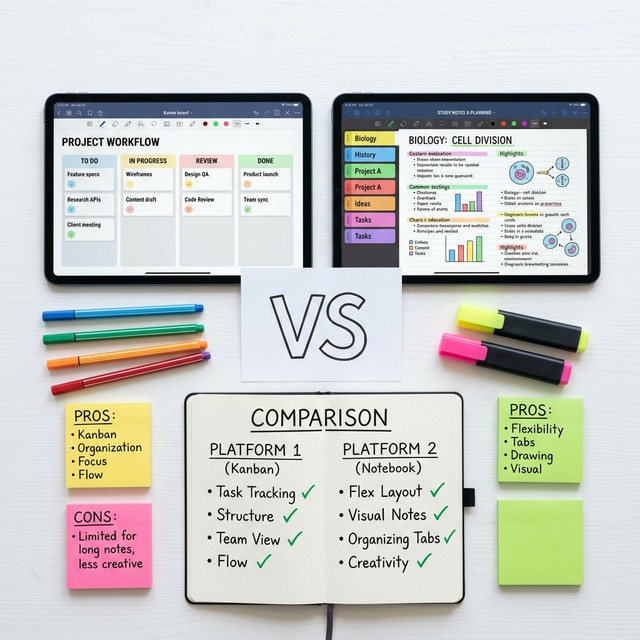
Organizational Philosophy
The fundamental difference between Notion and OneNote begins with their organizational
philosophies. Notion uses a block-based approach where every piece of content is a block
that can be a text paragraph, heading, image, database, embedded content, or dozens of
other types, combined within pages that can be nested infinitely within other pages to
create custom information architectures. This approach provides extraordinary flexibility
where students can build whatever organizational structures serve their needs, from simple
note collections through complex interconnected knowledge management systems with
databases, relational links, and custom views.
OneNote employs a notebook-section-page hierarchy that mirrors physical notebook
organization, providing a familiar metaphor that most students immediately understand
without instruction. The free-form canvas within each page allows placing content
anywhere spatially, creating non-linear layouts that support visual thinking and
spatial organization. This approach requires less initial decisions about structure
because the notebook metaphor provides ready-made organizational boundaries, enabling
students to begin capturing notes productively with minimal setup.
The flexibility-simplicity trade-off between these approaches significantly influences
user experience. Notion’s flexibility means students can create systems perfectly tailored
to their needs, but this same flexibility requires more upfront design decisions and
setup time before the system becomes productive. OneNote’s more structured approach limits
some customization possibilities but provides immediate productivity without requiring
system design investment, making it more accessible for students who want to start taking
notes immediately without building organizational infrastructure first.
Note-Taking Capabilities
Notion’s note-taking operates through its block system where text blocks create content,
toggle blocks create collapsible sections, callout blocks highlight important information,
and various other block types add functionality. The structured nature of blocks creates
clean, organized notes but within a primarily typed-text paradigm. While Notion supports
image insertion and some basic drawing, it does not offer native handwriting or digital
inking capabilities, making it less suitable for students who prefer handwritten notes
or need to capture handwritten mathematical notation frequently.
OneNote excels at multimedia note-taking with robust digital inking for handwriting and
drawing on supported devices, audio recording with linked note timestamps, screen
clipping, document printout insertion, and free-form content placement anywhere on the
infinite canvas. This multimedia richness makes OneNote particularly strong for lecture
note-taking where rapid capture of handwritten diagrams, annotated presentation slides,
and audio-linked typed notes creates comprehensive lecture records that text-only systems
cannot match.
For STEM students who frequently need to write mathematical equations, draw diagrams,
and annotate scientific figures, OneNote’s inking capabilities and ink-to-math conversion
provide native support that Notion cannot match without workarounds. For students
primarily working with typed text who value structured, database-linked notes over
handwriting flexibility, Notion’s block system and database integration provide
organizational capabilities beyond OneNote’s scope.
Database and Knowledge Management
Notion’s database capabilities represent perhaps its strongest differentiator, enabling
creation of structured data collections with custom properties, multiple views including
table, board, calendar, timeline, and gallery, and relational links between databases.
Students can build assignment trackers, grade calculators, resource libraries, reading
logs, and project management systems within the same workspace containing their notes,
creating interconnected academic management ecosystems that single-purpose tools address
only individually.
OneNote lacks native database functionality, organizing information through its
notebook-section-page hierarchy and tag system without the structured data management
capabilities that Notion’s databases provide. While OneNote tags enable marking content
with categories that can be summarized across notebooks, this tagging system provides
content classification rather than the structured data management, filtering, and
alternative view generation that Notion databases enable.
Notion’s linked databases and relation properties enable building interconnected
information systems where course notes link to assignment tasks which link to resource
libraries which link to study schedules, creating knowledge networks that reflect
academic information relationships. This relational capability appeals to students who
want their note-taking platform to serve broader academic management functions beyond
content capture and organization.
Collaboration Features
Both platforms support real-time collaborative editing, shared workspaces, and permission
management, though their collaboration implementations differ. Notion provides granular
page-level sharing permissions, real-time co-editing with visible collaborator cursors,
comment threads on specific blocks, and workspace member management with role-based
access controls. These features make Notion effective for collaborative project
documentation, shared knowledge bases, and team workspace management.
OneNote provides shared notebook functionality through OneDrive, real-time synchronization
across collaborators, author identification on contributed content, and Class Notebook
features specifically designed for educational contexts with instructor content
distribution, collaboration spaces, and individual student sections. OneNote’s educational
features including integration with Microsoft Teams and educational institution deployments
may provide smoother collaboration in school environments already using Microsoft
ecosystem tools.
Search and Information Retrieval
OneNote’s search is notably powerful, scanning across all notebooks including text within
images through OCR technology, handwritten content through handwriting recognition, and
audio recording tags. This comprehensive search means information is findable regardless
of the format in which it was captured, a significant advantage for multimedia note-takers.
Notion’s search operates across all workspace content with filters by workspace location,
creation date, and content type. While effective for text-based content search, Notion
lacks OCR capabilities for searching text within images and does not process handwritten
content, limiting search to typed text, page titles, and database properties.
Platform Availability and Offline Access
OneNote provides applications across Windows, Mac, iOS, Android, and web platforms with
robust offline functionality on desktop and mobile applications. Notes synchronize when
connectivity is restored, ensuring productivity continuity regardless of internet
availability. OneNote’s desktop applications particularly on Windows provide the most
feature-rich experience among their platform versions.
Notion offers web, desktop (Windows and Mac), and mobile (iOS and Android) applications
with more limited offline capabilities. While Notion has improved offline access, its
cloud-first architecture means some features require connectivity. Students frequently
working in low-connectivity environments may find OneNote’s offline capabilities more
reliable for uninterrupted productivity.
Learning Curve and Setup Investment
OneNote’s notebook metaphor and familiar interface enable productive use almost immediately,
with most students able to create organized notes within minutes of first opening the
application. The simplicity of the notebook-section-page structure and the familiarity
of free-form page editing minimize the learning curve for basic productivity.
Notion’s learning curve is steeper, requiring understanding of blocks, page nesting,
database creation, view configuration, and template usage before the platform’s full
power becomes accessible. The initial investment in learning Notion and building personalized
workspace structures can span weeks before the system becomes genuinely more productive
than simpler alternatives. However, this investment pays returns through capabilities
that simpler tools cannot match once mastery develops.
Pricing Comparison
OneNote is freely available as part of Microsoft’s consumer offerings, with full
functionality accessible without subscription for personal use. When included within
institutional Microsoft 365 subscriptions, additional integration benefits and storage
apply without additional cost to students.
Notion offers a free plan that is generous for personal use with unlimited pages and
blocks. Additional features for team collaboration and advanced database capabilities
may require paid plans. Education discounts may be available. Always check current
pricing on official websites as plans and pricing change periodically.
Choosing the Right Platform
Choose Notion if: You prefer typed notes with structured organization, want
database-driven academic management, enjoy building custom systems, do not need digital
inking, and are willing to invest initial learning time for long-term capability benefits.
Notion serves students who want an all-in-one workspace combining notes, task management,
and knowledge organization within a single interconnected platform.
Choose OneNote if: You prefer handwritten notes or need digital inking for diagrams
and equations, want immediate productivity without significant setup, value robust offline
access, already use Microsoft ecosystem tools, or prefer the familiar notebook organizational
metaphor. OneNote serves students who prioritize flexible note capture including
handwriting, multimedia inclusion, and reliable offline access within an immediately
approachable interface.
⚠ Note: The best note-taking platform is the one you will actually use
consistently. A less-capable tool used daily provides more value than a powerful tool opened
occasionally. Consider your actual usage patterns, not aspirational ones, when choosing between
platforms.
Conclusion
Notion and OneNote each provide excellent but distinctly different approaches to digital
note-taking and academic organization. Notion excels in flexible, database-driven
workspace creation that appeals to students wanting comprehensive academic management
platforms, while OneNote excels in multimedia note capture including handwriting support
that serves students prioritizing versatile, immediate note-taking capabilities. Consider
your primary note-taking methods, organizational preferences, technical comfort level,
existing tool ecosystem, and willingness to invest in setup when making your choice.
Trying both platforms with actual academic tasks often provides clearer insight than
feature comparison alone, revealing which platform’s workflow naturally matches your
study habits and academic needs.
Have experience with both platforms? Share what influenced your choice in the comments
below!